User Guide
By: Team CS2103-F09-3 (Mo YunBin, Jessica Jacelyn, Koh Su En, Zheng ZiKang)
- 1. Introduction
- 2. Quick Start
- 3. Features
- 4. FAQ
- 5. Command Summary
1. Introduction
Mr. Agent is a desktop app for managing contacts, optimized for use via a Command Line Interface (CLI) while still having the benefits of a Graphical User Interface (GUI). If you can type fast, Mr. Agent can get your contact management tasks done faster than traditional GUI apps.
2. Quick start
-
Ensure you have Java
11or above installed in your Computer. -
Download the latest
Mr Agent.jarfrom here. -
Copy the file to the folder you want to use as the home folder for your AddressBook.
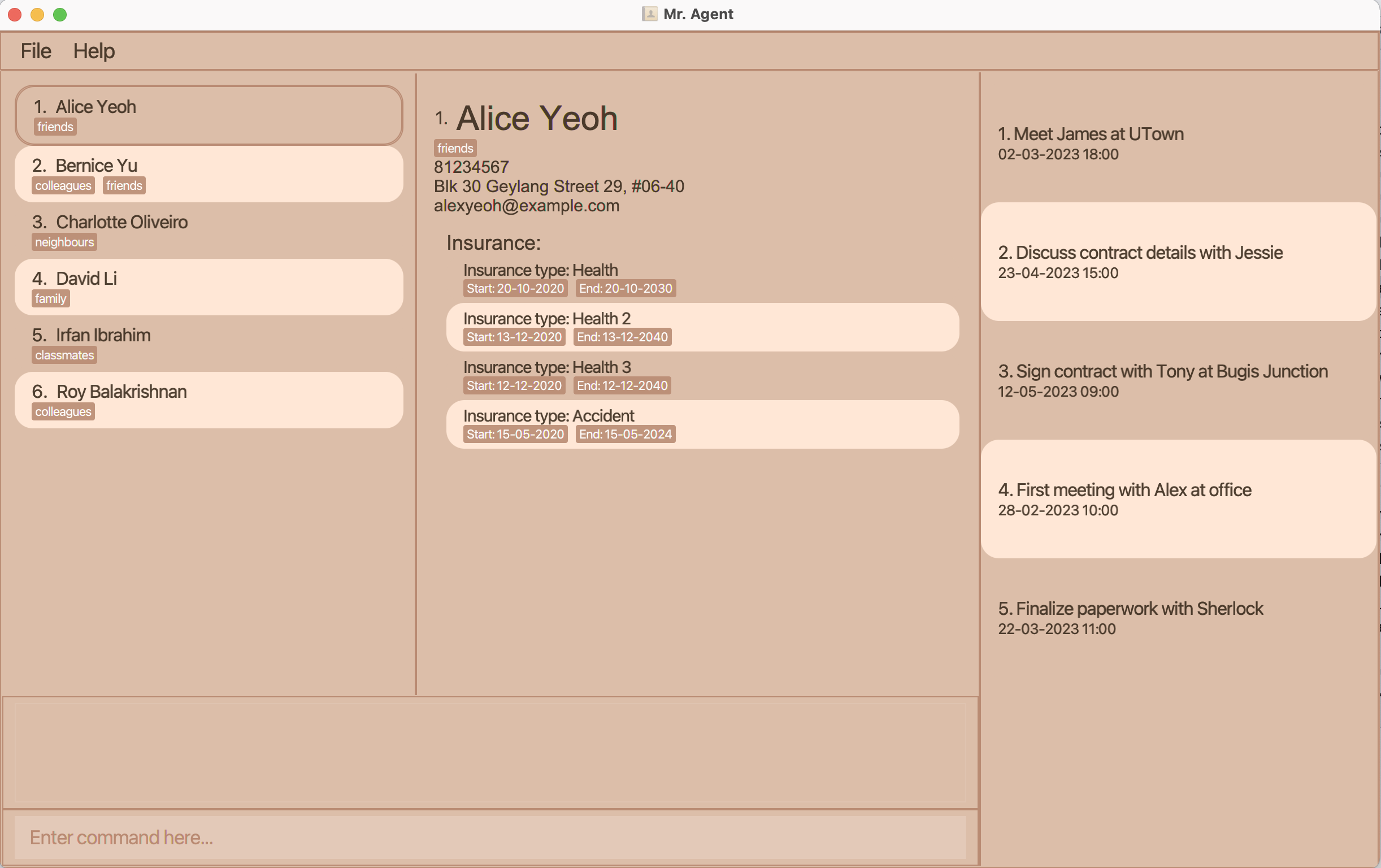
- Double-click the file to start the app. The GUI similar to the below should appear in a few seconds.
Note how the app contains some sample data, so before using the application for yourself, you should typeclearto clear them.
-
Type the command in the command box and press Enter to execute it. e.g. typing
helpand pressing Enter will open the help window.
Some example commands you can try:-
list -c: Lists all clients. -
add -c n/John Doe p/98765432 e/johnd@example.com a/311, Clementi Ave 2, #02-25 t/friends t/owesMoney: Adds a client namedJohn Doeto Mr. Agent. -
delete-c 3: Deletes the 3rd client shown in the current list. -
clear: Deletes all entry in Mr. Agent (use with caution!). -
exit: Exits the app.
-
- Refer to the Features below for details of each command.
 Please do not delete any json file in the generated
 data folder, deletion of a single data file could result in unexpected inconsistencies between data entries in the application.
3. Features
 Notes about the command format:
-
Words in
UPPER_CASEare the parameters to be supplied by the user.
e.g. inadd n/NAME,NAMEis a parameter which can be used asadd n/John Doe. -
Items in square brackets are optional.
e.g.n/NAME [t/TAG]can be used asn/John Doe t/friendor asn/John Doe. -
Items with
… after them can be used multiple times including zero times.
e.g.[t/TAG]…can be used ast/friend,t/friend t/familyetc. -
Parameters can be in any order.
e.g. if the command specifiesn/NAME p/PHONE_NUMBER,p/PHONE_NUMBER n/NAMEis also acceptable. -
If a parameter is expected only once in the command, but you specified it multiple times, only the last occurrence of the parameter will be taken.
e.g. if you specifyp/12341234 p/56785678, onlyp/56785678will be taken. -
Extraneous parameters for commands that do not take in parameters (such as
help,list,exitandclear) are not allowed.
3.1. Client Management
Adding a Client: add -c
Adds a client to Mr. Agent.
Note that client name must be unique. The client will be only identified by client name.
Format: add -c n/NAME p/PHONE_NUMBER e/EMAIL a/ADDRESS [t/TAG]…
 Tip:
A client can have any number of tags (including 0)
Tip:
A client can have any number of tags (including 0)
Examples:
add -c n/JunJie p/98765432 e/junjie@example.com a/John street, block 123, #01-01add -c n/Betsy Crowe t/friend e/betsycrowe@example.com a/Newgate Prison p/1234567 t/NUS
Listing all Client : list -c
Shows a list of all clients in the Mr. Agent.
Format: list -c
Deleting a Client : delete -c
Deletes the specified client from the Mr. Agent.
Format: delete -c INDEX
- Deletes the person at the specified
INDEX. - The index refers to the index number shown in the displayed person list.
- The index must be a positive integer 1, 2, 3, …
- Note that if a client is deleted, the records belong to this client will be deleted at same time.
Examples:
-
list -cfollowed bydelete -c 2deletes the 2nd person in the Mr. Agent. -
find -c Junjiefollowed bydelete -c 1deletes the 1st person in the results of thefindcommand.
Editing a Client : edit -c
Edits an existing client in the Mr. Agent.
Format: edit -c INDEX [n/NAME] [p/PHONE] [e/EMAIL] [a/ADDRESS] [t/TAG]…
- Edits the client at the specified
INDEX. The index refers to the index number shown in the displayed person list. The index must be a positive integer 1, 2, 3, … - At least one of the optional fields must be provided.
- Existing values will be updated to the input values.
- When editing tags, the existing tags of the person will be removed i.e adding of tags is not cumulative.
- You can remove all the person’s tags by typing
t/without specifying any tags after it.
Examples:
-
edit -c 1 p/91234567 e/johndoe@example.comEdits the phone number and email address of the 1st person to be91234567andjohndoe@example.comrespectively. -
edit -c 2 n/Betsy Crower t/Edits the title of the 2nd person to beBetsy Crowerand clears all existing tags.
Locating Clients by Name: find -c
Finds client whose name contain any of the given keywords.
Format: find -c KEYWORD [MORE_KEYWORDS]
- The search is case-insensitive. e.g
mikewill matchMike - The order of the keywords does not matter. e.g.
Lee Junjiewill matchJunjie Lee - Only the name is searched.
- Only full words will be matched e.g.
Lewill not matchLee - Persons matching at least one keyword will be returned (i.e.
ORsearch). e.g.Lee Junjiewill returnWong Junjie,Lee Yang
Examples:
-
find -c JohnreturnsjohnandJohn Doe -
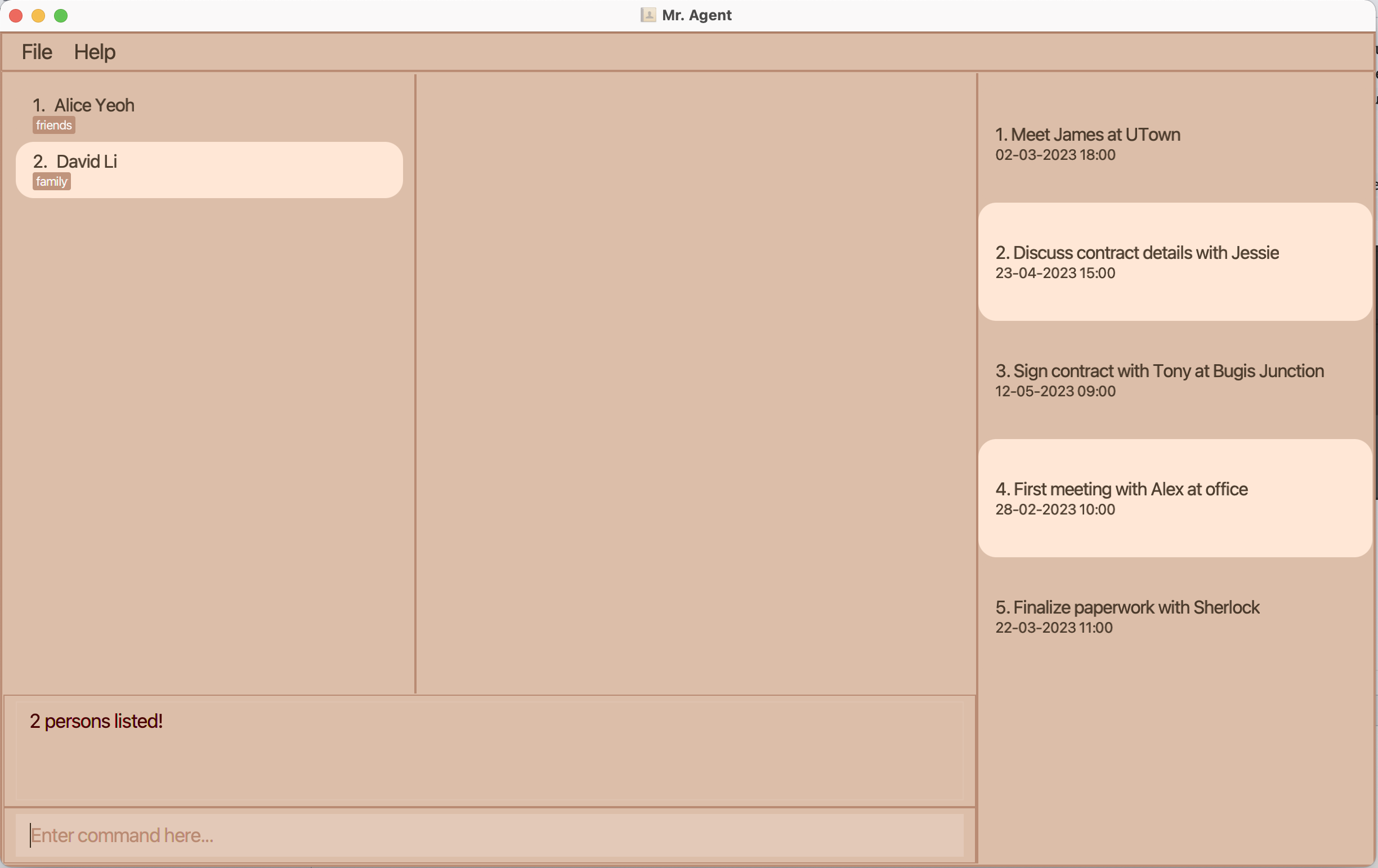
find -c alice davidreturnsAlice Yeoh,David Li
3.2. Insurance
Adding an insurance : add -i
Adds a new type of insurance to Mr. Agent.
Format: add -i t/TITLE p/PRICE
- Adds an insurance type as specified in the
TITLEwith itsPRICE - The price must be positive decimal number including 0
Examples:
add -i t/hosipitalision p/1999add -i t/terminal_illness p/199.99
Listing all insurances : list -i
Shows a list of all insurances in Mr. Agent.
Format: list -i
Deleting an insurance : delete -i
Deletes the specified insurance from Mr. Agent.
Note that if an insurance is deleted, the records related to this insurance will be deleted.
Format: delete -i INDEX
Editing an insurance : edit -i
Edits an existing insurance in the Mr. Agent.
Format: edit -i INDEX [t/TITLE] [p/PRICE]
- Edits the insurance at the specified
INDEX. The index refers to the index number shown in the displayed insurance list. The index must be a positive integer 1, 2, 3, … - At least one of the optional fields must be provided.
- Existing values will be updated to the input values.
Examples:
-
edit -i 1 t/MOTOR INSURANCE V2Edits the title of the 1st insurance to beMOTOR INSURANCE V2. -
edit -i 2 p/1999Edits the price of the 2nd insurance to be1999.
Locating insurances by title : find -i
Finds insurances whose title contain any of the given keywords.
Format: find -i KEYWORD [MORE_KEYWORDS]
- The search is case-insensitive. e.g
carwill matchCar. - The order of the keywords does not matter. e.g.
car homewill matchhome car. - Only the insurance title is searched.
- Only full words will be matched e.g.
insurancewill not matchreinsurance - Insurances matching at least one keyword will be returned (i.e. OR search).
e.g.
motor homewill returnMotor InsuranceandHome Insurance
3.3. Record
Adding a record : add -r
Adds a record to a client.
Format: add -r c/CLIENT_INDEX i/INSURANCE_INDEX sd/START_DATE ed/END_DATE
- START_DATE and END_DATE are in the format of dd-MM-yyyy
- Each client can have mutiple same type of insurance but the previous insurance should be expired before adding the new record. For example, if
add -r c/1 i/1 sd/02-01-2021 ed/01-03-2026exist in app, which means that the insurance type 1 will be expired on 01-03-2026, user cannotadd -r c/1 i/1 sd/01-03-2025 ed/01-03-2026as theSTARTDATEof this command is before theENDDATEof the previous command. - Client index and Insurance index starts from 1
- Note that insurance/client index will be based on a filtered list.
So you can
find -i/find -cto find insurance/client then add record base on the filtered result.
Examples:
-
add -r c/10 i/2 sd/23-02-2022 ed/23-02-2024, adds an insurance 2 to index 10 with start date from 23-02-2022 and end date at 23-02-2024 add -r c/25 i/2 sd/21-11-2021 ed/21-11-2023
Deleting a record : delete -r
Deletes the specified record from Mr. Agent.
Format: delete -r RECORD_INDEX
Listing all records : list -r
Shows a list of all unexpired records in Mr. Agent.
Format: list -r
Editing a record : edit -r
Edits an existing record in Mr. Agent.
Format: edit -r INDEX [c/CLIENT_INDEX] [i/INSURANCE_INDEX] [sd/START_DATE] [ed/END_DATE]
- Edits the record at the specified
INDEX. The index refers to the index number shown in the displayed record list. The index must be a positive integer 1, 2, 3, … - At least one of the optional fields must be provided.
- Existing values will be updated to the input values.
Example:
-
edit -r 1 c/2 i/2Edits the client and the type of insurance of the 1st record to be client 2 and insurance 2 respectively.
Finding records by keyword : find -r
Find records whose insurance name contains any of the given keyword.
Format: find -r KEYWORD [MORE_KEYWORDS]
- The search is case-insensitive, e.g.
healthwill matchHealth - The order of the keywords does not matter. e.g.
critical illnesswill matchillnes critical - Only the insurance name is searched
- Only full words will be matched, e.g.
heawill not matchhealth - Records matching at least one keyword will be returned (i.e.
ORsearch)
Example:
find -r health
Sort records : sort -r
Sorts the record list in ascending or descending order by start/end date.
Format: sort -r SORT_OPTION
- To sort in ascending order by start date, replace SORT_OPTION with
sa - To sort in descending order by start date, replace SORT_OPTION with
sd - To sort in ascending order by end date, replace SORT_OPTION with
ea - To sort in descending order by end date, replace SORT_OPTION with
ed
Example:
-
sort -r saSorts the records list by start date in ascending order.
The sort operation will be performed on the record list being displayed at that point of time. To sort the whole record list, issue a list -r command to list all the record first.
3.4. History
Listing appointment history : list -h
Shows a list of all passed appointments.
Format: list -h
Listing expired records : list -e
Shows a list of all expired records.
Format: list -e
3.5. Appointment
Adding an appointment : add -a
Adds a new appointment with client.
Format: add -a d/DESCRIPTION dt/DATETIME
- only present or fututre
DATETIMEis allowed.
Examples:
add -a d/Meet James dt/20-02-2022 18:00
Listing all appointments : list -a
Lists all ongoing appointments in Mr. Agent.
Format: list -a
Deleting an appointment : delete -a
Deletes the specified appointment from Mr. Agent.
Format: delete -a APPOINTMENT_INDEX
Editing an appointment : edit -a
Edits an existing appointment.
Format: edit -a APPOINTMENT_INDEX [d/DESCRIPTION] [dt/DATETIME]
Locating appointments by keyword : find -a
Find appointments whose title contains any of the given keyword
Format: find -a KEYWORD [MORE_KEYWORDS]
Sorting appointments : sort -a
Sorts the appointment list ascending or descending order by time.
Format: sort -a SORT_OPTION
- To sort in ascending order, replace SORT_OPTION with
a - To sort in descending order, replace SORT_OPTION with
d
The sort operation will be performed on the appointment list being displayed at that point of time. To sort the whole appointment list, issue a list -a command to list all the appointment first.
Clear appointments : clear -a
Clear all appointments (including expired and unexpired ones).
Format: clear -a
3.6. Others
Clearing all entries : clear
Clears all entries from the Mr. Agent. Use with caution.
Format: clear
Exiting the program : exit
Exits the program.
Format: exit
4. FAQ
Q: How do I transfer my data to another Computer?
A: Install the app in the other computer and overwrite the empty data file it creates with the file that contains the data of your previous Mr. Agent home folder.
5. Command Summary
| Action | Format, Examples |
|---|---|
| Add a client |
add -c n/NAME p/PHONE_NUMBER e/EMAIL a/ADDRESS [t/TAG]… e.g., add -c n/James Ho p/22224444 e/jamesho@example.com a/123, Clementi Rd, 1234665 t/friend t/colleague
|
| Delete a client |
delete -c INDEXe.g., delete -c 3
|
| Edit a client |
edit -c INDEX [n/NAME] [p/PHONE_NUMBER] [e/EMAIL] [a/ADDRESS] [t/TAG]…e.g., edit -c 2 n/James Lee e/jameslee@example.com
|
| Find a client |
find -c KEYWORD [MORE_KEYWORDS]e.g., find -c James Jake
|
| List all client | list -c |
| Add an insurance | add -i t/TITLE p/PRICE |
| Delete an insurance | delete -i INSURANCE_INDEX |
| Edit an insurance | edit -i INSURANCE_INDEX [t/TITLE] [p/PRICE] |
| Find insurance(s) | find -i KEYWORD [MORE_KEYWORDS] |
| List all insurance | list -i |
| Add an appointment | add -a d/DESCRIPTION dt/DATETIME |
| Delete an appointment | delete -a APPOINTMENT_INDEX |
| Edit an appointment | edit -a APPOINTMENT_INDEX [d/DESCRIPTION] [dt/DATETIME] |
| Find appointment(s) | find -a KEYWORD [MORE_KEYWORDS] |
| List all appointments | list -a |
| Sort appointments in ascending order by time | sort -a a |
| Sort appointments in descending order by time | sort -a d |
| Clear all appointments | clear -a |
| Add a record | add -r c/CLIENT_INDEX i/INSURANCE_INDEX sd/START_DATE ed/END_DATE |
| Delete a record | delete -r RECORD_INDEX |
| Edit a record |
edit -r INDEX [c/CLIENT_INDEX] [i/INSURANCE_INDEX] [sd/START_DATE] [ed/END_DATE] e.g., edit -r 1 c/5
|
| Find record(s) | find -r KEYWORD [MORE_KEYWORDS] |
| List all record | list -r |
| Sort record in ascending order by start/end date |
sort -r sa/ sort -r ea
|
| Sort record in descending order by start/end date |
sort -r sd/ sort -r ed
|
| List appointment history | list -h |
| List expired records | list -e |